
One morning there was an anonymous letter in the mailbox. A neighbour (identity unknown, courage insufficient to knock) was complaining that our dogs had been barking all night. The WHOLE night. Non-stop. Apparently they’d been throwing a canine rave and hadn’t even invited us.
 |
 |
The thing is, we were home for most of it.
Most people would just ignore it and move on. But I’m an SRE — when something is disputed, I reach for data.
My first attempt was a GPS tracker for the dogs that supposedly detected barking too. It sort of worked — the app showed a little bark icon when it triggered — but the data was completely useless. No timestamps, no intensity levels, nothing you could actually analyse. Just a push notification and a vague feeling that something happened at some point. I wanted numbers. A time series. Ideally something I could screenshot and slip under the neighbour’s door.
So I tried reverse-engineering the platform. Poked the API, sniffed the traffic, chased endpoints with the determination of someone who has a point to prove. Nothing. Dead ends.
Fine. I’ll build my own.
If I was going to instrument my house over a neighbourly dispute, I was at least going to do it right — ESP32, MQTT, a Go backend, and OpenTelemetry metrics going straight into Dynatrace (where I work, so no excuses for not using it). As you do.
The result is a dog bark detector that captures audio, computes noise levels, and produces proper timestamped, queryable data that no anonymous letter can argue with. This post walks through the whole stack — hardware, firmware, messaging, and observability.
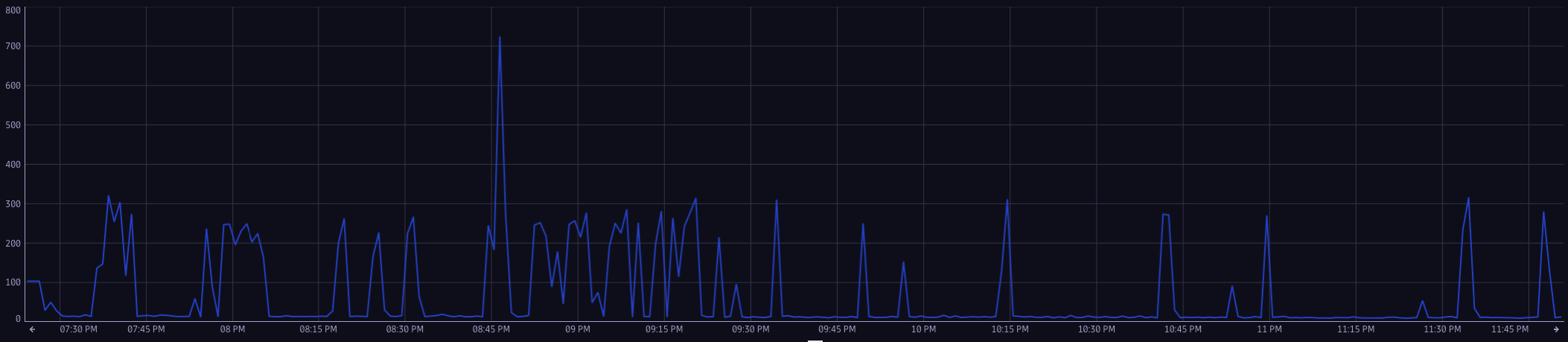
Source code: github.com/cvegagimenez/bark-detector
Architecture overview
Before diving into the details, here’s the big picture of how data flows through the system:
Microphone → ADC
              ↓
        ESP32 firmware
  (DC filter → RMS → NTP timestamp)
              ↓
        MQTT publish
              ↓
    Mosquitto broker
              ↓
        Go backend
  (subscribe → parse → controller)
              ↓
    OpenTelemetry SDK (metrics)
              ↓
  OTel Collector → Dynatrace
Hardware
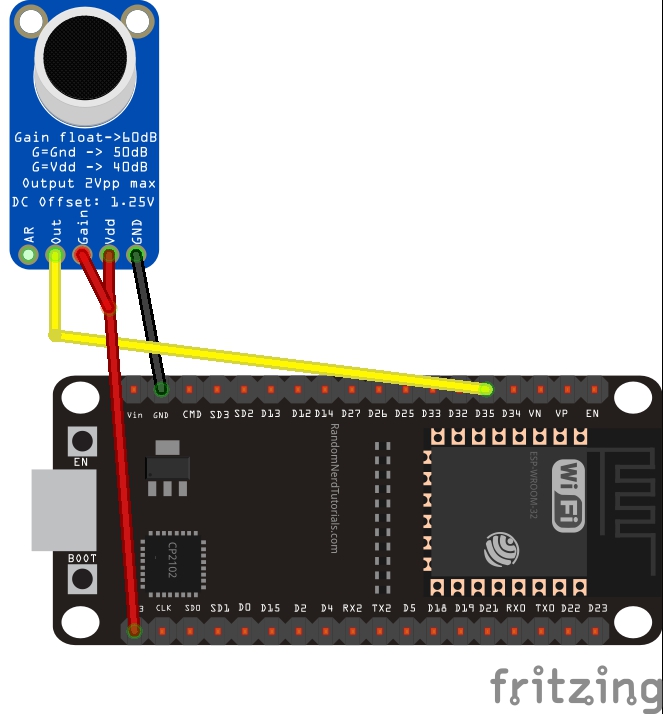
| Component | Pin | Notes |
|---|---|---|
| Mic VCC | 3.3 V | Do not use 5 V — the ESP32 ADC is 3.3 V tolerant |
| Mic GND | GND | Common ground |
| Mic OUT | GPIO 35 | Analogue input, input-only pin |
Firmware
Wi-Fi and MQTT
The ESP32 uses its built-in Wi-Fi to connect to the local network and reach the MQTT broker. A key design detail is an ensureMqttConnected() function called at the top of every loop iteration — it silently re-establishes both the Wi-Fi association and the broker connection if either has dropped. For a device running unattended for days, resilient reconnection matters more than you’d think.
Time synchronisation (SNTP)
Every measurement is timestamped with a Unix epoch fetched from pool.ntp.org via SNTP. This is what makes the data meaningful in Dynatrace — without accurate timestamps you can’t correlate bark events with anything else (who left, when, for how long). The ESP32 doesn’t have a real-time clock that persists across power cycles, so syncing to NTP on startup and periodically during operation is essential.
Audio processing and RMS
Every 100 samples (~500 ms) the firmware computes the RMS (Root Mean Square) of the buffer and publishes the result to MQTT.
RMS is defined as the square root of the mean of the squared samples:
RMS = sqrt( (x₁² + x₂² + ... + xₙ²) / N )
It’s the standard way to express the power of a signal, and it’s the right choice here for three reasons:
- A simple average is useless for audio. Sound waves swing equally positive and negative around zero, so a plain mean is always close to zero regardless of how loud the environment is.
- Peaks lie. A hand clap, or a door slam spikes the reading sky-high for one sample and then it’s gone — useless for detecting something that actually lasts a few seconds. Averaging the squares over a 500 ms window irons those out.
- It actually reflects how loud something sounds. Squaring the samples gives more weight to the louder moments, which is closer to how our ears work. Fun fact: this is also why household mains voltage is quoted as RMS — 230 V RMS, not the 325 V peak the waveform actually reaches.
A dog bark is a burst of sustained energy. A consistent run of elevated RMS values over several consecutive windows is a far more reliable indicator than any single reading.
MQTT
MQTT (Message Queuing Telemetry Transport) is a lightweight publish-subscribe protocol designed for constrained devices and unreliable networks. It is an ideal fit for IoT scenarios because:
- Tiny overhead — the fixed header is just 2 bytes.
- Decoupling — the ESP32 publishes without knowing who is subscribed; the Go backend subscribes without knowing the publisher.
MQTT topic design
The payload published on the bark topic follows a pipe-delimited format:
{epoch}|{sensorID}|{rmsValue}
For example:
1710345600|sensor-01|42.73
This simple schema is easy to parse and extend. The sensorID field allows multiple bark detectors to share the same broker and topic while remaining distinguishable in Dynatrace.
Go backend
The Go server is the subscriber side of the MQTT bus. It subscribes to the bark/metrics topic, parses each incoming payload into a typed Measurement (timestamp, sensor ID, RMS value), and hands it off to the OpenTelemetry layer. That’s essentially it — it’s a small, focused bridge between MQTT and the monitoring platform.
It’s built in three internal packages to keep concerns separate: MQTT connectivity, payload parsing, and OTel metric recording. The parsing and recording functions are independently unit-tested, which matters when the pipeline is the only observable thing between the hardware and your dashboard.
What’s next
The project is under active development. The road ahead includes:
- Bark detection algorithm — RMS above a threshold is a reasonable first heuristic, but a proper detector will use a frequency-domain filter or a small ML model to distinguish barks from other loud noises (doors slamming, music, etc.).
- Alerting — trigger a notification (email, Slack, PagerDuty) when bark activity exceeds a configurable threshold for a sustained period.
- Multi-sensor support — the
sensorIDdimension is already in place; deploying a second device requires no code changes on the backend. - Web dashboard — a simple UI to visualise historical bark activity per sensor.